bimmer-tool
bimmer-toolAuto & Vehicles
4.038.00 Reviews
- Version
- 3.8.26
- Installs
- 10.00K
- Age Rating
- Everyone
Screenshots
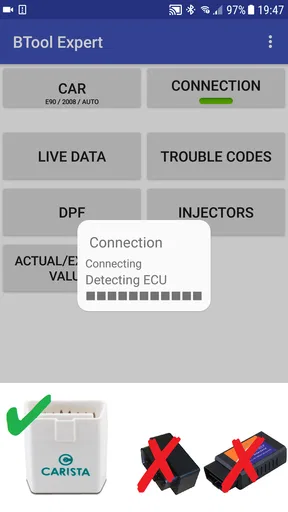
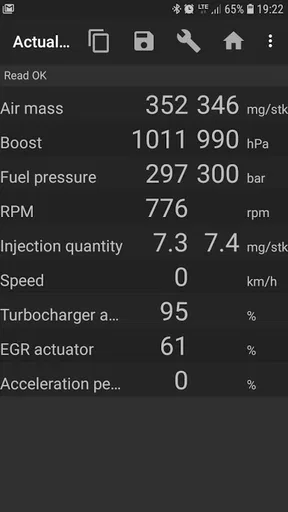
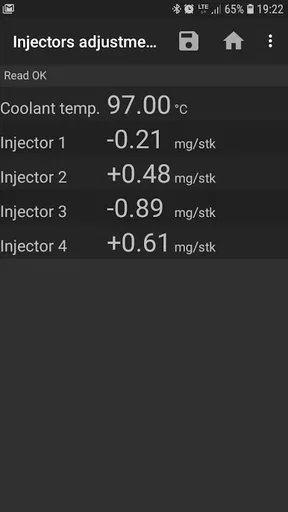
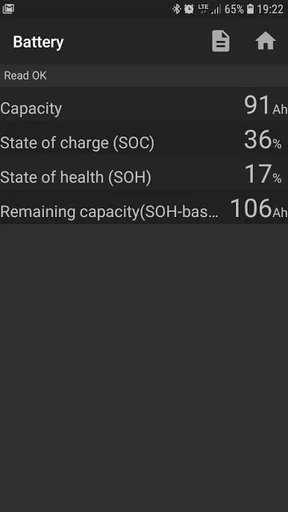
Our Review of bimmer-tool
 Analysis by Appyee
The first week with bimmer-tool is likely to feel most rewarding when you already have a specific question about your BMW. A warning light, a need to check live readings, or an interest in DPF regeneration gives the app a clear job from the start. Rather than browsing a generic car dashboard, you are opening a phone-based diagnostic tool aimed at BMWs. I find that focus more useful than a long feature list: it helps set expectations that this is equipment for checking and understanding a vehicle, not a general driving companion.
That focus also makes the first session easier to judge. Before connecting, I would check that the OBD adapter is compatible with the car and the app, then begin with a straightforward task such as reading a fault code. This avoids treating a connection problem as a vehicle problem. If you are new to diagnostics, write down what you see before clearing anything; a code can be useful evidence when you later speak with a mechanic, even if you cannot diagnose its cause yourself.
What the first week is good for
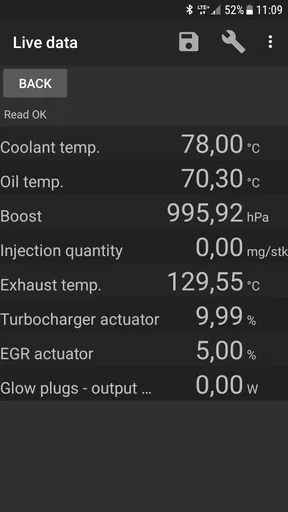
The clearest early use is a quick check when something changes. If a warning appears before a planned drive, you can connect and see whether the car has recorded a fault rather than relying on guesswork. Live data gives a second kind of value: it lets you observe readings while the car is running, which can make an intermittent symptom easier to discuss. I would use those readings as clues, not as proof that a component is healthy or faulty; knowing how to interpret them matters as much as seeing them.
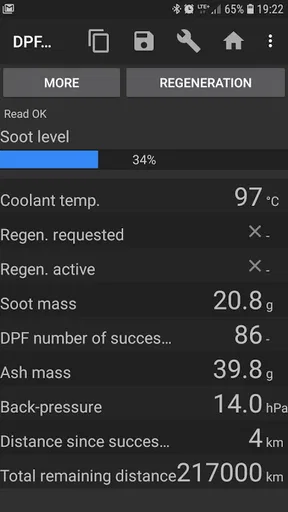
DPF regeneration is another reason a BMW owner may install it, but it is not a casual button to press simply because the option is present. I would first learn what the function is intended to do for the particular vehicle and follow suitable vehicle-specific guidance. When the issue is urgent, unclear, or accompanied by serious symptoms, a qualified technician is a better next step than experimenting from a phone.
Where it fits in a regular routine
After the novelty wears off, the app earns space if it answers questions that recur in your ownership. A driver who keeps a BMW for years may find occasional fault checks and live readings useful, especially when deciding whether a small symptom needs attention now or can be described at the next service. That is a different kind of value from opening an app every day: I would treat this as an occasional workshop companion, not something that needs to become part of every trip.
A practical routine is to connect when there is a reason, record the result, and compare it with the car’s behavior rather than repeatedly scanning without a plan. For example, if a warning comes and goes, note the circumstances and any readings you are checking, then see whether the same pattern returns. This gives you a more useful conversation with a repair shop and helps avoid clearing a code before you understand what it might indicate. The app can make information easier to access, but it cannot replace inspection or sound mechanical judgment.
Unleashing the Power of bimmer-tool
First off, if you’ve got a BMW, you know how important it is to keep everything running smoothly. With bimmer-tool, you can perform a variety of diagnostic functions straight from your smartphone. Think of it as your personal mechanic, without the hefty bills.
Simple Setup and Interface
Getting started with bimmer-tool is a breeze. All you need is a compatible OBD adapter, and you’re good to go. The app’s interface is super intuitive, making it easy for even the less tech-savvy among us to navigate. You’ll find all your main options neatly laid out, so there’s no fumbling around trying to figure out where to tap next.
Diagnostic Features Galore
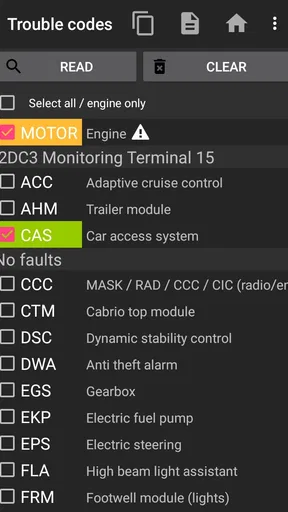
This app doesn’t mess around when it comes to diagnostics. You can read and clear trouble codes, which is a lifesaver when that pesky check engine light pops up. Plus, it gives you access to real-time data, so you can monitor your car’s performance on the go. Whether you’re checking fuel efficiency or keeping tabs on engine temperature, bimmer-tool has got you covered.
Customization Options
One of the coolest features has to be the customization options. The app lets you tweak various settings in your car, from lighting preferences to unlocking hidden features you didn’t even know existed. It’s like giving your BMW a little personality boost!
Regular Updates and Support
Another thing to love about bimmer-tool is the regular updates. The developers are always on top of adding new features and fixing bugs. Plus, if you ever run into issues, their support team is pretty responsive. It feels good knowing you’re not left hanging if something goes awry.
Who Should Use bimmer-tool?
If you’re a BMW owner who loves having control over your vehicle’s diagnostics and settings, this app is definitely for you. It’s particularly useful for DIY enthusiasts who enjoy tinkering with their car’s settings. However, even if you’re not a car guru, the app’s straightforward design makes it accessible to all.
Sure, there are many diagnostic tools out there, but the convenience of having everything on your phone is unbeatable. Plus, the ability to customize your car’s settings adds a layer of fun that other tools might lack.
Ownership costs and compatibility checks
The price changes how I would approach a purchase: at $19.99, this is not an impulse download for someone who only wants to clear a warning once. I would first confirm that the app supports my BMW and that I have an appropriate adapter, then weigh the cost against how often I expect to use diagnostics or live data. The developer is bimmer-tool, and the app is rated for Everyone, but neither point removes the need to check the fit with your own vehicle and adapter.
It runs on Android, with version 3.8.18 requiring Android 5.0 or newer. The app has been available since August 1, 2017, and its average rating is 4.0 from around 1.9K ratings; it has also passed 10K installs. Those figures suggest an established audience, but they do not guarantee that every function suits every model. I would use them as context, then verify compatibility before paying rather than assume that “BMW-focused” means universal coverage.
There is a useful distinction between the app and the diagnostic setup around it. The phone interface may make access convenient, but the adapter is part of the working chain; a poor connection can waste time or produce a frustrating first impression. If you already own a compatible adapter, the purchase is easier to justify. If not, compare the total cost and check the adapter’s connection type and support before ordering anything.
A roadside check that stays practical
Imagine a check-engine warning appears while you are away from home. With an adapter already in the car, you can pull over somewhere safe, connect, and read the stored code. The useful outcome is not necessarily a do-it-yourself repair: it may simply be knowing what information to pass to a garage and whether the warning is accompanied by other symptoms. I would not operate the phone while driving, and I would not treat a code as permission to continue if the car is running badly or showing a serious warning.
This is where a BMW-specific app can have an advantage over a basic universal reader. A generic scanner may be sufficient for someone who wants only a simple code check across different makes, while this app is more appealing if BMW diagnostics and vehicle-related functions are the reason for buying. A workshop scanner remains the better choice for a professional who needs a broader, established repair workflow. The phone option sits between those choices: more convenient for an owner than dedicated shop equipment, but dependent on the right adapter and the user’s ability to interpret results.
Changing settings calls for restraint
Customization can be enjoyable, especially when you want the car to behave more like your own, but I would separate coding experiments from routine diagnostics. Before changing a setting, record its current state and make one change at a time. That simple habit makes it easier to identify what caused an unexpected result and to reverse course. Hidden options are not automatically improvements; a feature may be unavailable, unsuitable, or undesirable for a particular car or driver.
I would also avoid making changes in a hurry before a long trip. Use a calm moment, understand what a setting controls, and check the result while the car is parked. This is a genuine trade-off of having customization in the same app as diagnostics: convenience encourages experimentation, while vehicle settings deserve more care than changing a phone preference. If your priority is simply repairing a fault, leave customization aside until the underlying issue is understood.
What can become tiring over time
The main source of fatigue is not constant notifications or a daily maintenance routine; it is the gap between having access to data and knowing what action to take. A stream of readings can look reassuringly precise without answering why a symptom is happening. Someone who wants a plain-language diagnosis and a guaranteed fix may be disappointed. In that situation, a mechanic’s inspection or a simpler reader used only to retrieve a code may be a better fit.
There is also a learning curve hidden behind the friendly phone format. You still need to choose a suitable adapter, connect it correctly, and understand that clearing a code can erase useful context without fixing the cause. I would never clear a recurring warning just to make the dashboard look tidy. Keep a record first, and if the fault returns, treat that as a reason to investigate rather than repeat the same cycle.
Who will keep it installed
I can see lasting value for BMW owners who do their own basic checks, like tracking symptoms, or want occasional access to diagnostics without buying workshop equipment. It makes less sense for someone who rarely works with a car, owns several makes and wants one broad tool, or expects an app to replace a mechanic. It is also not an ideal purchase if you have no compatible adapter and do not expect to use the functions beyond one isolated warning.
The app is best understood as a way to bring useful vehicle information closer to the owner. It can help you ask better questions, observe a problem more carefully, and approach a repair appointment with clearer notes. It cannot guarantee a diagnosis, prevent every fault, or make unfamiliar changes risk-free. Keeping that boundary in mind is what turns occasional use into a practical habit instead of a frustrating attempt to make a phone do the whole job.
Long-term verdict
For me, bimmer-tool earns a place on the phone when a BMW owner has a compatible setup and will return to it for real checks, not just curiosity. The Auto & Vehicles app has a focused purpose, and that can be more valuable than a universal tool if BMW-specific diagnostics and functions are what you need. It has an average rating of 4.0 and around 37 written reviews, but I would still base the decision on compatibility, the adapter, and your own comfort reading vehicle information.
My recommendation is measured: buy it if you expect to use its diagnostic access more than once and are willing to learn the basics; skip it if you want a one-tap verdict or only need a scanner for occasional use across different brands. The app’s lasting value is not that it replaces a garage. It is that, used carefully, it can help you notice patterns, preserve useful fault information, and make a more informed decision about when professional help is needed.
Verdict
Strengths of bimmer-tool
- Comprehensive diagnostics for BMW vehicles.
- User-friendly interface with intuitive navigation.
- Supports both OBD standard and BMW-specific protocols.
- Regular updates with new features and fixes.
- Compatible with a wide range of BMW models.
Limitations of bimmer-tool
- Limited functionality in the free version.
- Requires an OBD adapter for full features.
- Some features need a stable internet connection.
- Advanced diagnostics require in-app purchases.
- Not all features are available for older models.
Similar Picks in This Category
View All
Android Auto
Google LLC4.1

maxim — order a taxi & food
PT. SITO4.7

Штрафы ГИБДД: проверка с фото
Pays LLC – Штрафы ГИБДД4.7

Номерограм – проверка авто
Авто Ассист4.8

Дром Авто
Дром4.9

Frequently Asked Questions
What is bimmer-tool and what does it do?
Bimmer-tool is a specialized app designed for BMW enthusiasts and owners. It provides diagnostic capabilities, allowing users to read and clear fault codes, monitor real-time data, and perform various service functions. The app is compatible with both Android and iOS, making it accessible for a wide range of users.
Is bimmer-tool compatible with all BMW models?
Bimmer-tool supports a broad range of BMW models, but compatibility may vary depending on the specific features of the app. It's crucial to check the app's compatibility list on the developer's website or within the app description to ensure your BMW model is supported before downloading.
What are the main features of bimmer-tool?
The main features of bimmer-tool include reading and clearing diagnostic trouble codes, displaying live data, and performing service resets. Additionally, it offers battery registration and adaptation, and supports various coding functions. These features aim to provide users with a comprehensive tool for maintaining and optimizing their BMW vehicles.
Are there any in-app purchases or subscription fees for bimmer-tool?
While bimmer-tool can be downloaded for free, it may offer in-app purchases or require a subscription to access advanced features. Users should review the pricing structure within the app to understand any potential costs associated with unlocking additional functionalities or premium services.
How user-friendly is the bimmer-tool app for beginners?
Bimmer-tool is designed with a user-friendly interface, making it accessible for both beginners and experienced users. However, those new to vehicle diagnostics may need some time to familiarize themselves with the features. The app provides tutorials and guides to help users navigate its functionalities effectively.
